Salesforce Engineering · Technical guide
When should an Agentforce agent query Salesforce objects or ground on Data 360?
Query Salesforce objects when the agent needs current records in one org. Use Data 360 for harmonized data, identity, or unstructured knowledge.
- Written by
- Michał TargielSalesforce Tech Lead & Integration Specialist
- Published
- Reading time
- 14 min read
Short answer
If the agent needs current records in one Salesforce org, query those objects with Query Records, or with Flow or Apex when that is not enough. Employee agents run as the logged-in user, under that profile, field-level security, and sharing. Use Data 360, formerly Data Cloud, to harmonize many systems, resolve identity, or ground the agent on unstructured knowledge. A Service agent that cannot run as a logged-in user uses the Agent User with only the access the job needs.
The question people are actually asking
Architects are being told to put the data in Data Cloud, now Data 360, without a rule for when the agent should read the org it is already standing in. A Salesforce Stack Exchange thread (opens in a new tab) asks for a recommended architecture for making Data Cloud data available to Agentforce, and how CRM, Data Cloud, the agent, Flow or Apex, and external systems fit together. That thread is the question. It is not the guidance. The product statements in this note come from Salesforce Help, read on 25 November 2026.
Note
Nothing here describes a particular org, a licence you hold, or a result Synairo has delivered. It is a reading of the Help pages linked in the text.Is it still Data Cloud, or is it Data 360?
About Salesforce Data 360 (opens in a new tab) says that as of 14 October 2025, Data Cloud was rebranded to Data 360. During the transition you may still see Data Cloud in the application and in the documentation. The page says the name is new and the functionality and content are unchanged. This note uses Data 360 (formerly Data Cloud) on first mention, then Data 360. Data Cloud stays in the title so the older search still lands.
The same rename is discussed, with the EU AI Act timeline, in Agentforce, Data Cloud and the EU AI Act. That note does not replace the Help pages cited here.
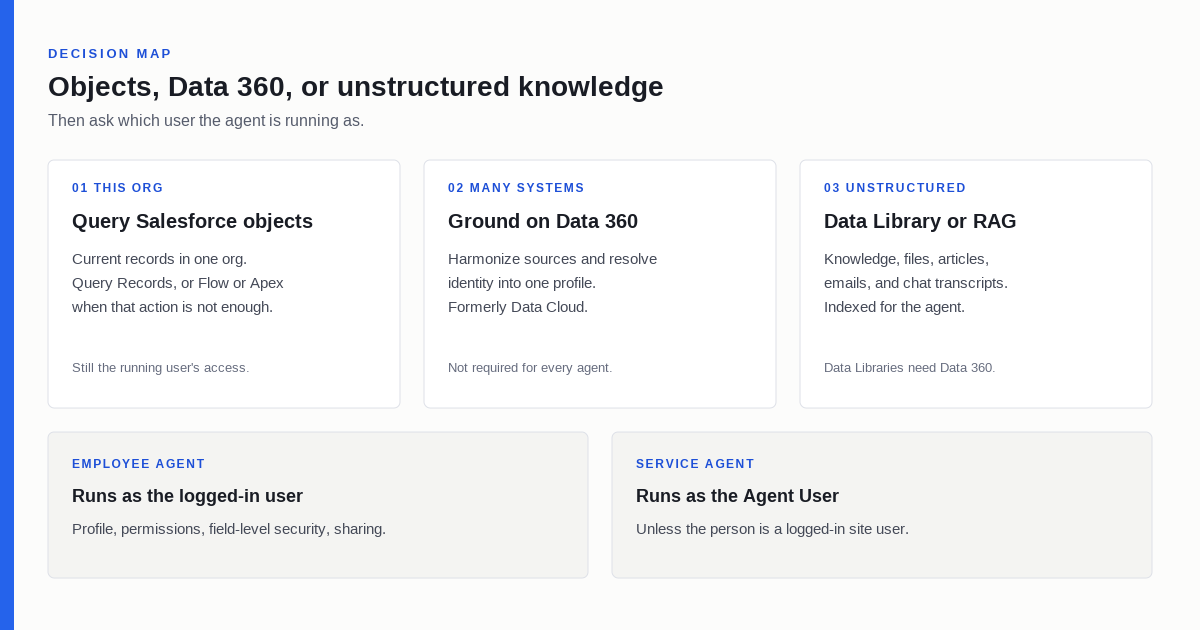
Illustrative map of the decision in this note. It is not a Salesforce diagram. Each rule is cited from Salesforce Help in the sections below.
When should the agent query Salesforce objects directly?
Query the objects in this org when the agent needs the current state of records that already live there, and the running user can already see them. The standard action is Query Records (opens in a new tab). Use a Flow or Apex action when the lookup needs tighter logic, a result Query Records will not return, or more than one object. That path is still inside the org, and it still runs in the agent's execution context.
Agent Execution Context and Data Access by Type (opens in a new tab) is the page that says who that running user is. An Employee agent runs as the logged-in user. A Service agent runs as the Agent User, unless it is a logged-in Experience Cloud site user under credential-based verification. In each case Help says data access is governed by that user's profile, permissions, field-level security, and sharing rules.
What are the limits of Query Records?
Query Records (opens in a new tab) finds records from the user's request and from field conditions. The considerations on that page are the reason a Flow or Apex action sometimes replaces it. They are also the reason not to describe the action as a general SOQL runner.
| Limit | What the Help page says |
|---|---|
| Language | The action supports only English. |
| Objects | Searchable and queryable standard objects supported by the User Interface API, and searchable custom objects. External objects are not supported. |
| More than one object | A request cannot return data from multiple objects, such as leads and opportunities together. It can filter through one parent-to-child or child-to-parent relationship. |
| Rows | At most 50 results are displayed, even when more records match. |
| Field values | Field normalization is not available, so a value such as a phone number matches only in the stored format. |
| Which fields | Account, Contact, Case, Opportunity, and Lead expose a limited set of default fields. Other fields are used only when they are on the default searchable layout and the default record page layout. A large field set can be cut down by the action. |
| Fields shown | Up to three fields come from the query and up to 10 from the search layout. A field in both is counted once, so the total is not a fixed 10. |
| Partial access | If the request needs two fields and the user can access only one, the action returns an error rather than a partial result. |
Lookups, related lists, and picklists do not always work. Ambiguous words such as "top" are interpreted by the model, not by a business rule. Synonyms for custom objects and fields are not always read as you intend.
When should the action call Flow or Apex instead?
Salesforce Help does not publish a sentence that says "call Flow instead of Query Records." The decision follows from the limits above. Call Flow or Apex when the agent must read an external object, return data from more than one object, go past one relationship filter, return more than 50 rows, run in a language other than English, or apply a rule the standard action does not have. The action is still a query of this org.
Recommendation
Keep that Flow or Apex action in the same user context as the agent, unless you have a reason to raise it. The next section records that a flow can be set to system context, including system context without sharing. That setting is a different access decision, not a side effect of leaving Query Records.When should the agent ground on Data 360?
Use Data 360 when the agent needs something this org's current records do not already provide. About Salesforce Data 360 (opens in a new tab) describes the product as ingesting data, harmonizing it to a standard data model, unifying it with identity resolution rulesets, and grounding that data for Agentforce. Better Together: Data and AI (opens in a new tab) says Data 360 helps you consolidate disparate data sources into unified profiles of customers or accounts. The same page says you can bring in structured or unstructured data, including audio, support chats, and PDFs.
That page also says that while some existing AI features do not require Data 360, Data 360 is what supports AI grounded in all of your data sources. Do not treat Data 360 as mandatory for every Agentforce agent. Ground Agentforce in Data (opens in a new tab) lists three methods, not one: a Data Library, retrieval augmented generation in Data 360, and Search the Web for information that is not in Salesforce, such as news or market information.
How do Data Libraries and RAG ground unstructured knowledge?
Agentforce Data Library (opens in a new tab) indexes knowledge articles and fields, file uploads, or web sources, and you assign the library to an Agentforce feature so the agent has a defined set of information to answer from. The page says you must have Data 360 set up, and that data libraries consume Data 360 credits. It does not publish a credit quantity on that page, so this note does not invent one. In a Data Cloud One companion org, the library data source has to be a custom retriever. Knowledge or Files are not supported as the data source there.
Retrieval Augmented Generation (opens in a new tab) describes RAG in Data 360 as a framework for grounding prompts with knowledge from unstructured data sources, for agents and for users. Ground with Knowledge Using Retrieval Augmented Generation (opens in a new tab) says to add that knowledge to prompt templates and names articles, emails, chat transcripts, and other sources. Retrievers search knowledge that is indexed in Data 360. The page notes that Einstein Search has been renamed to Retriever.
Limitation
A Data Library and RAG ground answers on indexed unstructured sources: knowledge, files, web pages, articles, emails, or chat transcripts. Query Records reads Salesforce records. Use the library or RAG for that unstructured material, and Query Records when the agent needs field values on records in the org.Do Employee agents and Service agents use the same access model?
No. Agent Execution Context and Data Access by Type (opens in a new tab) separates them, and it adds a third type, Lead Nurturing, so the choice is not only Employee or Service. Credential-based user verification, where a Service agent runs as the site user, is available for Enhanced Chat v1 or Enhanced Chat v2 deployed to Experience Cloud sites only.
| Agent | Runs as | Access is governed by |
|---|---|---|
| Employee | The logged-in user | That user's profile, permissions, field-level security, and sharing rules. |
| Service, without credential-based verification | The Agent User (EinsteinServiceAgent User) | The Agent User's profile, permissions, field-level security, and sharing rules. Internal org-wide defaults apply. |
| Service, with credential-based verification | The logged-in Experience Cloud site user | That site user's profile, permissions, field-level security, and sharing rules. |
| Lead Nurturing | The EinsteinSDRAgent User | That agent user's profile, permissions, field-level security, and sharing rules. |
Employee agents are for internal users on Lightning Experience, the Salesforce mobile app, an Experience Cloud portal, or Slack. Help says it is not necessary to scope their queries to user-specific data, because they already run as that user. User access to the Employee agent itself is managed with permission sets or profiles.
What is an Agent User, and how should its permissions be set?
A Service agent on a channel that is not limited to logged-in users cannot use the customer's user record to decide access. Configure Service Agent Access (opens in a new tab) calls the dedicated user record the agent user. You create or select it when you make the Service agent. After creation, Help lists these properties: name EinsteinServiceAgent User, user licence Einstein Agent, profile Einstein Agent User, internal org-wide defaults, the permission sets Agentforce Service Agent Secure Base and the agent's own permissions set, and the permission set group AgentforceServiceAgentUserPsg. That group contains Agentforce Service Agent User, Data Cloud User, and Prompt Template User. The permission set licences named on the page are Agentforce Service Agent User, Data Cloud, and Einstein Prompt Templates.
The page says the agent user is created with minimal access so the agent is secure by default, and that you expand access for the use case on the principle of least privilege. It also says the converse: if the agent has access to data it does not need, it can expose proprietary information to customers. Only users with admin permissions can view or edit agent users.
- Give the minimum object permissions for each object the agent touches through a flow, Apex, or a prompt template. Add Messaging Session if the agent is connected to an Enhanced Messaging channel. Edit the agent's own permissions set, or another permission set tied to the Einstein Agent licence and the Einstein Agent User profile.
- Assign a role that can see or edit the records the job needs, and no broader role. Help points at the role hierarchy for that choice.
- Review sharing. When the agent runs as the Agent User, internal org-wide defaults apply. Help says to restrict those defaults and to create sharing rules that grant access selectively, excluding the Einstein Agent User where that is appropriate.
- For the model around that configuration, Salesforce publishes Agentforce Security and the Shared Responsibility Model (opens in a new tab). This note does not quote that page.
An unidentified visitor is a different record. The first time such a person starts a session on Enhanced Web Chat, Salesforce creates an Agentforce Guest User if one does not exist. Help says that user has minimal permissions, no permission sets, and cannot access records. Do not confuse the Guest User with the Agent User that runs the agent.
Do actions respect sharing rules and field-level security?
The agent's own data access does. Agent Execution Context and Data Access by Type (opens in a new tab) says access is governed by the running user's profile, permissions, field-level security, and sharing rules. For an Employee agent that user is the person who is logged in. For a Service agent that is not a logged-in site user, that user is the Agent User. Query Records follows the same line: if the person can see only one of two fields the request needs, the action errors instead of returning a partial row.
A flow called by an action is a second decision. Help says the flow's run context and the agent's execution context both apply. In user context, object permissions, field-level security, and sharing are the running user's. System context with sharing can read all objects and fields and still applies the running user's sharing rules. System context without sharing can read all objects and fields, and the Help table marks sharing rules as not applicable. When a Service agent runs as the Agent User, the flow's running user is that Agent User, not the customer.
Limitation
Saying that Agentforce respects sharing is true of the execution context. It is not true of every flow you attach, if that flow is set to system context without sharing. Read the flow's run context before you treat the action as least privilege.Do context variables control what a Service agent can see?
No. Configure Service Agent Access (opens in a new tab) and the execution-context page both say that a context variable such as MessagingSession.ContactId tells the agent who the person is. It does not control data access. Without more configuration, the customer can reach the records the Agent User can reach. Help says you must limit that access on purpose.
The documented way to narrow it is to pass a verified customer id into the VerifiedCustomerId variable, to scope the Apex or flow the action calls to that id, and to filter subagents and actions so they require the variable. Some standard actions, such as Get Cases for Verified Contact, already check the verified id. Help still says to test and adjust each action. A context variable on its own is not that check.
A short decision checklist
- 01One org, and the agent needs the current records the running user can already see: query the objects. Start with Query Records. Move to Flow or Apex when that action cannot express the lookup.
- 02Many systems, or identity that has to be resolved into one profile: Data 360. Harmonize to the standard model and unify with identity resolution before you ask the agent to treat that profile as the person.
- 03Unstructured knowledge, such as articles, files, emails, or chat transcripts: a Data Library or RAG in Data 360. A Data Library requires Data 360 and consumes Data 360 credits.
- 04Then ask who the agent runs as. Employee: the logged-in user. Service, not a logged-in site user: the Agent User, created with minimal access and expanded only for the job. Context variables name the person. They do not grant the records.
- 05If a flow runs the query, read its run context. User context keeps the running user's sharing and field-level security. System context without sharing does not.
Where Synairo fits
Synairo is two senior engineers in Warsaw. The company designs and builds Salesforce architecture and enterprise integrations, which is the work this choice sits in. If you are deciding whether an agent should query this org or ground on Data 360, describe the systems and the access model on the contact page.
Short answers
When should an Agentforce agent query Salesforce objects instead of Data 360?
When it needs the current records in that one org and the running user can already see them. Use Query Records, or Flow or Apex when Query Records cannot express the lookup.
When should an Agentforce agent be grounded on Data 360, formerly Data Cloud?
When the job is to harmonize many systems, resolve identity into a unified profile, or ground the agent on unstructured knowledge. Data 360 is not required for every agent.
Is Data Cloud still called Data Cloud, or is it Data 360?
Salesforce Help says Data Cloud was rebranded to Data 360 as of 14 October 2025, and that the functionality is unchanged. Documentation may still say Data Cloud.
Do Employee agents and Service agents use the same access model?
No. An Employee agent runs as the logged-in user. A Service agent runs as the Agent User, unless credential-based verification makes it run as a logged-in site user.
Do Agentforce actions respect sharing rules and field-level security?
The agent's data access is governed by the running user's profile, permissions, field-level security, and sharing rules. A flow set to system context without sharing does not apply sharing rules.
What are the limits of the Query Records action?
English only; no external objects; no result that returns multiple objects; at most 50 rows; format-sensitive values; a limited field set. It can filter through one relationship.
When should an action call Flow or Apex instead of Query Records?
When the lookup needs something Query Records does not support, such as several objects, more than 50 rows, or an external object. The call is still inside the org and still runs as the agent's user, subject to the flow's run context.
What is an Agentforce Agent User, and how should its permissions be set?
It is the dedicated user a Service agent runs as when it cannot use a person's user record. Salesforce creates it on the Einstein Agent User profile with minimal access. Add only the object, role, and sharing access the job needs.
Do context variables control what data a Service agent can see?
No. A variable such as MessagingSession.ContactId identifies the person. It does not grant records. Without further limits, the person can reach whatever the Agent User can reach.
How do Data Libraries and RAG in Data 360 ground unstructured data?
A Data Library indexes Knowledge, files, or web sources and requires Data 360. RAG in Data 360 retrieves from unstructured sources such as articles, emails, and chat transcripts and adds that knowledge to the prompt.
The same rule, in one sentence
Query the org when the agent needs its current records, and use Data 360 when the job is harmonized data, identity, or unstructured knowledge, under the user the agent is actually running as.
The three pages to re-read first are Ground Agentforce in Data (opens in a new tab), Query Records (opens in a new tab), and Agent Execution Context and Data Access by Type (opens in a new tab). Permissions for the Service agent are on Configure Service Agent Access (opens in a new tab).