Open source · Apache-2.0 · Live
ScanForce Open
Open-source document processing for Salesforce. A native workspace that submits Salesforce Files to a provider you choose, tracks job state, supports human review, and can write extracted values back to linked records - without claiming that OCR runs inside Salesforce.
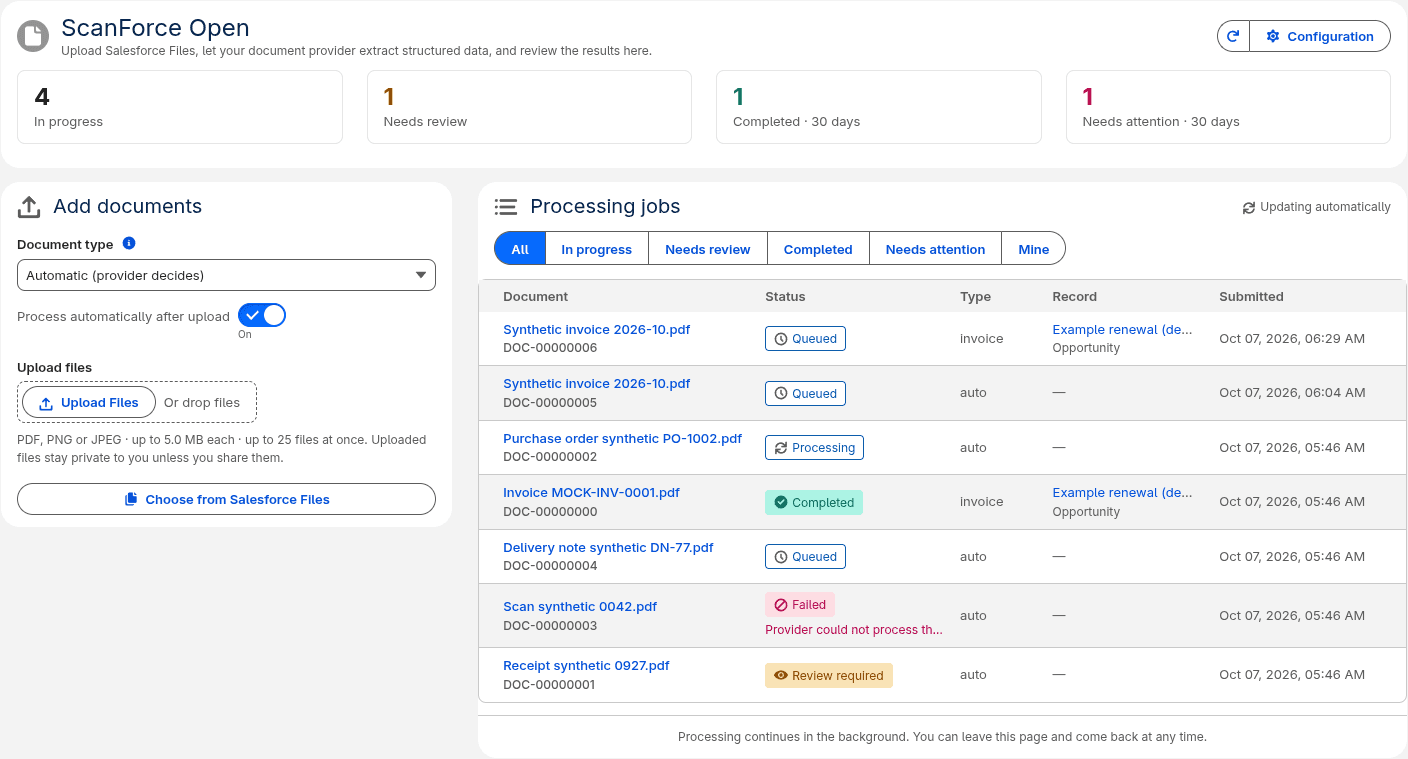
Authentic workspace screenshot from the public ScanForce Open repository. Processing still requires a configured /connect/v1 provider.
Problem and solution
Document bytes in Salesforce Files are not enough.
Teams often need invoice, purchase-order, or contract data on Salesforce records. Building that stack from scratch means file access checks, async job state, retries, review routing, result presentation, Flow entry points, and safe record updates - before any OCR model enters the picture.
ScanForce Open is the Salesforce-native processing workspace for that problem. It owns submission, durable jobs, review coordination, result display, and optional field mapping. Extraction itself runs in an external provider behind a small open HTTP protocol.
It is not the retired Scanforce managed package. ScanForce Open was rebuilt from scratch, shares no implementation with the predecessor, and has no in-place upgrade path from legacy packages. Retirement notice.
Features
What the shipped application actually does
Capabilities below match the public repository documentation. Roadmap ideas that are not implemented are not advertised here.
Submit from Files
Upload PDFs and images, or select existing Salesforce Files the user is already allowed to see.
Async job states
Track Queued, Processing, Completed, Review Required, Failed, Cancelled, and Timed Out on private job records.
Fields and line items
Display compact extracted results as fields and tables once the provider returns a bounded payload.
Apply to records
Preview extracted values and apply them to the linked Salesforce record through configurable field mappings.
Flow and Apex
Five Flow actions plus an Apex API cover process, refresh, recover, apply mappings, and read extracted values.
Idempotency & recovery
Duplicate submissions do not create duplicate provider work. A recovery scheduler sweeps interrupted jobs.
Bring your own provider
One Named Credential points at DocSolved.ai or any HTTPS backend that implements /connect/v1.
Admin configuration
External Credentials hold the API key. Permission sets gate users and administrators. No public file links.
Architecture
Salesforce Files → job → provider → review → record
Apex services and Queueables drive background work. LWC covers the workspace, job detail, record documents, and configuration. Flow and Apex are first-class entry points. Jobs are private. Named and External Credentials own the callout. The gateway is provider-neutral.
- 01
Salesforce Files
PDF, PNG, or JPEG up to 5 MiB. Upload new or select an existing ContentVersion the user can already see.
- 02
ScanForce Open
Workspace, record documents component, Flow actions, or Apex API - every entry point checks Use ScanForce Open.
- 03
Processing job
Private SfdcDcx_Processing_Job__c row: status, provider job id, compact result JSON, errors, review link.
- 04
Named Credential
callout:SfdcDcx_Provider. API key lives in an External Credential. Salesforce initiates every HTTPS request.
- 05
Provider /connect/v1
DocSolved.ai or any compatible custom backend. Extraction runs outside Salesforce; the protocol stays the same.
- 06
Review & mapping
Fields and line items in the UI. Optional field mappings write previewed values onto the linked Salesforce record.
- User-mode auth
- File and source-record access are checked as the submitting user before trusted processing starts.
- Queueable + recovery
- One Queueable item per transaction; a five-minute Recovery Scheduler sweeps interrupted work.
- Idempotency
- Duplicate submissions reuse provider work instead of creating parallel jobs for the same file version.
- Provider-neutral
- Salesforce code has one gateway and one state machine. Switching providers is configuration, not a rewrite.
OCR and extraction run in the configured provider, not inside Salesforce. Document bytes leave the org over HTTPS to that provider. This diagram matches the public architecture documentation for ScanForce Open; it is not a customer landscape.
User experience
Workspace, completed jobs, review, and setup
Screenshots are taken from the upstream documentation set - the same images administrators and developers see in the repository.
Workspace - job list across statuses
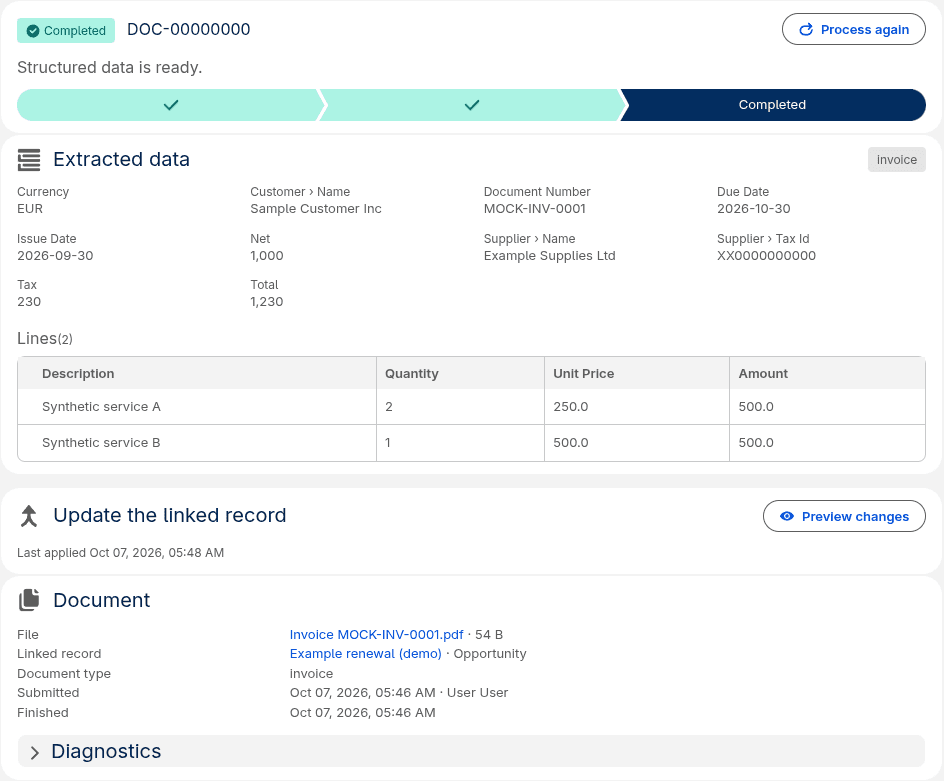
Completed job - fields and line items
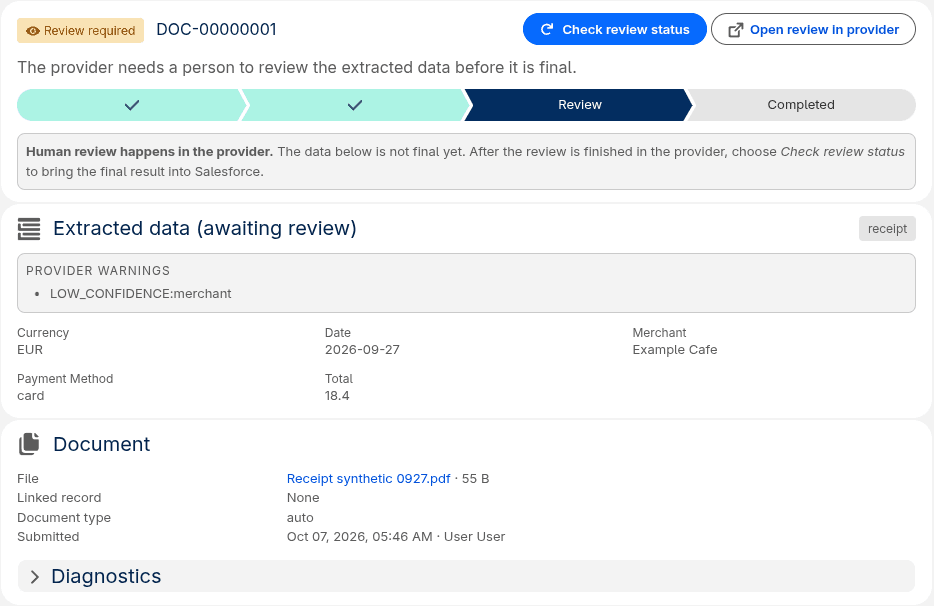
Review Required - human checkpoint
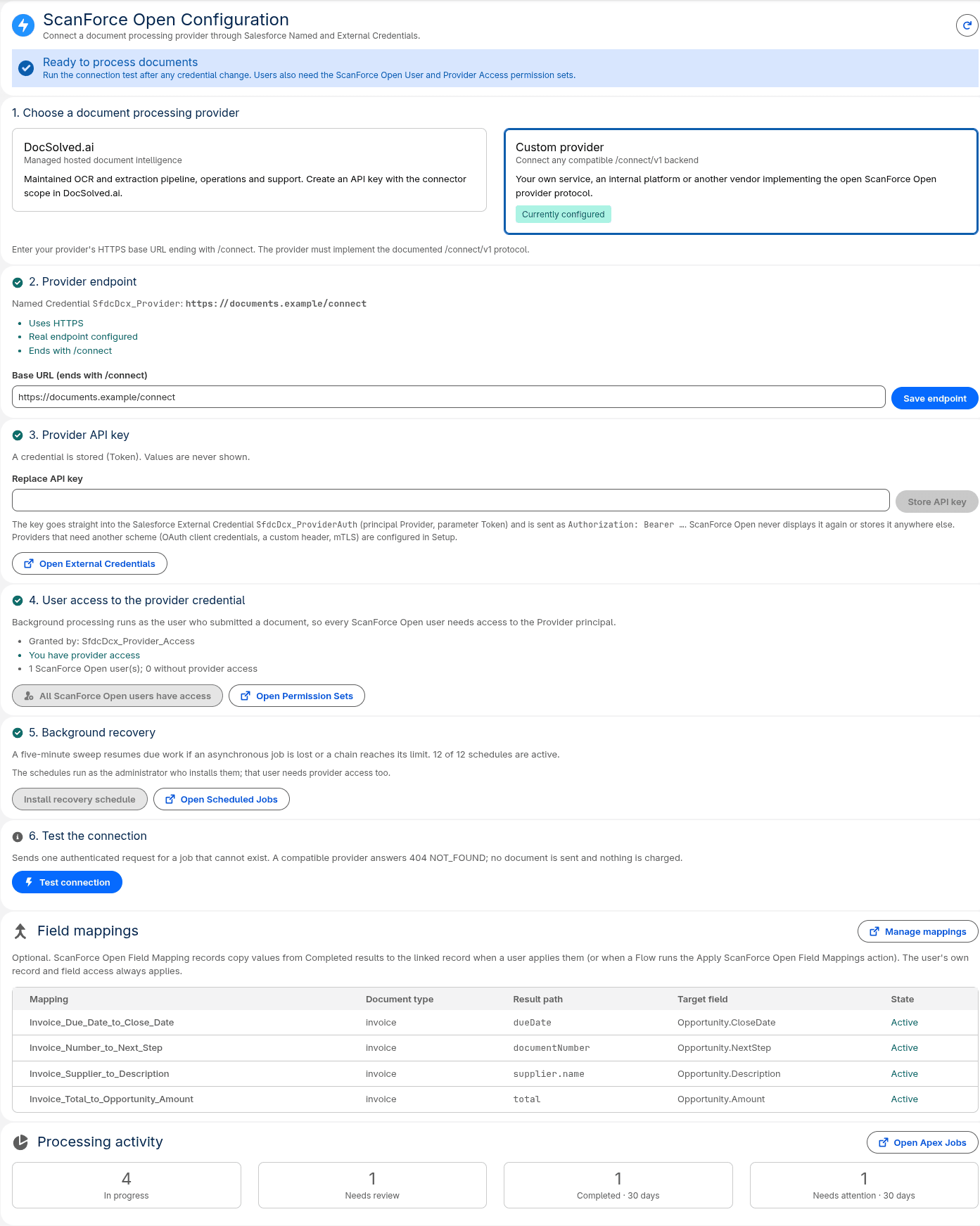
Configuration - provider and credentials
For administrators
Install, connect, assign, recover
There is no AppExchange install button and no officially distributed managed package on this page. Installation is from source with Salesforce CLI.
- 01
Install from source
Clone the repository, authenticate with Salesforce CLI, and run the install script against a Developer Edition, sandbox, scratch org, or Enterprise org.
- 02
Configure the provider
Open ScanForce Open → Configuration. Point the Named Credential at DocSolved.ai or your custom /connect endpoint, store the API key in the External Credential, and run Test connection.
- 03
Assign access
Assign the connector and admin permission sets. Users need Use ScanForce Open; configuration needs Administer ScanForce Open.
- 04
Schedule recovery
Enable the recovery sweep so interrupted Queueable work is re-picked on a five-minute cadence.
- 05
Map fields (optional)
Add SfdcDcx_Field_Mapping__mdt records for the result paths you want written onto source objects. No mappings ship by default.
- 06
Add the record component
Place the Record Documents Lightning component on Lightning record pages where users should process related Files.
For developers
Apex, Flow, metadata, and an open protocol
Apex API
SfdcDcx_Api exposes process, refresh, recover, apply mappings, and value lookup for custom automation.
Five Flow actions
The same operations are available as invocable actions so admins can wire document processing without Apex.
Custom metadata mappings
Field mappings are metadata, not hard-coded paths, so orgs shape result-to-record writing without changing package code.
Provider protocol
Three HTTPS endpoints under /connect/v1. A dependency-free reference provider and a conformance checker ship in the repo.
Implementation examples, the reference provider, and the conformance checker live in the repository: developer documentation (opens in a new tab), provider protocol (opens in a new tab), custom provider guide (opens in a new tab).
Bring your own provider
Provider independence is the product boundary
ScanForce Open talks to one configured Named Credential. Behind it you can use DocSolved.ai (opens in a new tab) as an optional hosted provider, or a custom HTTPS service that implements /connect/v1 (opens in a new tab). Switching providers is a configuration change - not a rewrite of the Salesforce application.
Arbitrary OCR APIs do not plug in directly. They need a protocol adapter that speaks the documented connect contract. A reference provider and conformance checker exist so you can validate that adapter before pointing a production org at it.
DocSolved.ai details live on docsolved.ai. Synairo.com only describes the optional integration path documented upstream (provider-docsolved.md (opens in a new tab)).
Security and reliability
Documented guarantees - and the boundary that matters
Salesforce access checks
File and source-record visibility are checked in USER_MODE before trusted processing starts. Classes are with sharing.
Private jobs
Processing jobs are a private custom object. Results stay on the job until a user or automation applies mapped fields.
Credentials in Salesforce
Provider API keys live in External Credentials. Providers never receive Salesforce session credentials or public file links.
Validated, bounded responses
Provider payloads are validated and size-bounded before they are stored as compact JSON on the job.
Bytes leave the org
Submitted document bytes are sent to the configured provider over HTTPS. Provider security posture is not identical across backends - choose and review yours.
Human review
When the provider signals Review Required, ScanForce Open surfaces that state and can open the provider review experience where supported.
Full model: security documentation (opens in a new tab).
Technical specifications
Verified project limits
The Salesforce application is free under Apache License 2.0. Document processing services may be paid separately.
- File types
- PDF, PNG, JPEG
- File size
- 5 MiB per file
- Submission size
- 25 files per submission
- Providers per org
- One Named Credential / provider endpoint per org
- Processing window
- Up to 15 remote attempts or 60 minutes, then Timed Out
- Platform
- Salesforce Lightning, Apex, Salesforce Files
- Distribution
- Source install with Salesforce CLI (not AppExchange on this page)
- License
- Apache License 2.0
Getting started
Clone, install, connect, process
Plan about fifteen minutes once you have a provider endpoint or DocSolved connector key. The application cannot process documents until a compatible provider is configured.
git clone https://github.com/michalTargiel91/scanforce-open.git
cd scanforce-open
sf org login web --alias my-org
bash scripts/install.sh --target-org my-org --provider docsolved
# or: --endpoint https://provider.example.com/connect
Open-source project
Public source, Apache-2.0, provider-neutral by design
The GitHub repository is the authoritative source for functionality, limitations, installation, and contribution. Issues and Discussions are the support channels documented upstream.
Working with Synairo
Need a custom Salesforce document workflow?
Synairo designs and builds Salesforce architecture, enterprise integrations, and document intelligence. ScanForce Open is one open-source building block - not a substitute for every landscape.